LTX-1 is a lightweight video generation AI model (2B parameters) released by Lightricks, positioned as a practical solution for high-volume generation on GPUs in the VRAM 16GB class. Licensing differs by checkpoint: the v0.9.1 build measured here is limited to academic and research purposes. Sources: Lightricks Official LTX Video Model Page / Hugging Face Lightricks/LTX-Video Model Card
The overview of LTX-1 itself, model selection criteria, and introductory usage guides are explained on our sister site “AI Tool Encyclopedia” in the article What is LTX Video? Features, Usage, and Required Specs for AI Video Generation. This current article serves as a section dedicated to actual benchmark data; reading them together will deepen your understanding.
- RTX 5080: 5 min 9 sec per clip (309 s), Peak VRAM 15.9 GB, Peak RAM +25.9 GB (Author’s measurement / nvidia-smi data)
- RTX 5060 Ti (Oculink): 9 min 12 sec per clip (552 s), Peak VRAM 16.0 GB, Peak RAM +27.2 GB (Author’s measurement)
- The times above cover the LTX-1 generation process plus RIFE VFI interpolation. Additional time is required for the separate step of 4K upscaling.
- LTX 2.3 (22B AV version) cannot be loaded with standard loaders; running it at volume on VRAM 16GB is currently unrealistic.
- Author’s operational track record: Generated 928 clips over 3 months → Uploaded approx. 30% to Adobe Stock → Acceptance rate of 45.7% (based on official Adobe Stock review result emails received in the last 4 days).
- Scope Verified in this Article
- Verification Environment
- Actual File Sizes of Various LTX Versions
- RTX 5080 vs RTX 5060 Ti Comparison (Identical Workflow)
- Processes Not Included in Benchmark Times (Important)
- VRAM / RAM / Time Breakdown by Phase (RTX 5080 Details)
- Live Production Track Record: 3 Months, 928 Clips Generated, Adobe Stock Acceptance Rate 45.7%
- Example Generation Prompt for One Clip (Production-Level / Live Operations)
- Three Reasons Why LTX-2.3 is Unsuitable for High-Volume Work with 16GB VRAM
- Three Options for Users with 16GB VRAM
- Summary: Don’t Chase the Latest; Mass Produce with Proven Models
- References
Scope Verified in this Article
This article documents primary measurements taken by the author using LTX-1 within a live production workflow, utilizing an RTX 5080 (VRAM 16GB) and an RTX 5060 Ti 16GB connected via Oculink. Measurements were conducted on ComfyUI with settings identical to pre-production for Adobe Stock assets: 1024×576 resolution, 241 frames, 50 steps, RIFE VFI (frame interpolation x2), and H264 mp4 output. Sources: Official ComfyUI (Comfy.Org) / Official RIFE GitHub (megvii-research/ECCV2022-RIFE)
To state the conclusion first, if you aim to generate video at volume with 16GB VRAM, LTX-1 is the practical solution. Note that the v0.9.1 build measured in this article is licensed for academic and research purposes only — Section 5 of that license folds creating any content with the model into “Use”, so generation itself is covered. If you plan to sell the output, use a v0.9.6 or later checkpoint (for example ltxv-2b-0.9.8-distilled), which falls under the LTXV Open Weights License 0.X. While LTX 2.3 is newer, it cannot establish a stable production line in an environment limited to 16GB VRAM.
Verification Environment
| Item | Configuration |
|---|---|
| Main GPU | NVIDIA RTX 5080 (VRAM 16GB GDDR7, PCIe 5.0) |
| Sub-GPU | NVIDIA RTX 5060 Ti 16GB (via Oculink / MINISFORUM DEG1) |
| CPU | Intel Core i7-14700F |
| System RAM | DDR5 96GB |
| Storage | NVMe SSD 2TB x 2 |
| OS | Windows 11 |
| ComfyUI | v0.9.1 (embedded Python 3.12 / PyTorch 2.9.1+cu128) |
| Operational Model | ltx-video-2b-v0.9.1.safetensors (LTX-1) |
| Text Encoder | t5xxl_fp16.safetensors |
| Post-processing | RIFE VFI v4.9 (rife49.pth) Frame interpolation x2 (30fps → 60fps) |
| Benchmark Date | April 17, 2026 |
Sources: Author’s local setup / Hugging Face Lightricks/LTX-Video / Official RIFE release (v4.9)
Actual File Sizes of Various LTX Versions
| Model | Size | Status |
|---|---|---|
| ltx-video-2b-v0.9.1 (LTX-1) | 5.72 GB | Lightweight and fast. Runs comfortably on 16GB VRAM. Author’s operational model. |
| ltxv-13b-0.9.7-distilled-fp8 | 15.69 GB | 13B distilled fp8. Barely fits in 16GB VRAM. |
| ltx-2-19b-dev-fp8 | 27.08 GB | 19B dev fp8. Offloading required. |
| ltx-2.3-22b-distilled-fp8 (AV) | 29.53 GB | Newest version with audio support. Not compatible with standard loaders. |
The sizes listed are actual values obtained by directly running ls on the safetensors files in the author’s environment, matching the dimensions stated in each model card on the Hugging Face Lightricks organization page. Sources: Hugging Face Lightricks Organization Page (Verified April 2026)
RTX 5080 vs RTX 5060 Ti Comparison (Identical Workflow)
The same settings were executed on both GPUs: 1024×576 resolution, 241 frames, 50 steps, CFG 3.0, and RIFE VFI x2. In this article, the RTX 5080 was measured using bf16 precision, while the RTX 5060 Ti used fp8 quantization mode; however, both GPUs can operate with either bf16 or fp8.
Time per Clip and VRAM/RAM Consumption
| Item | RTX 5080 (16GB) | RTX 5060 Ti 16GB (Oculink) | Difference |
|---|---|---|---|
| Total Generation Time | 309 seconds (5 min 9 sec) | 552 seconds (9 min 12 sec) | The 5060 Ti is 1.79x slower. |
| Peak VRAM | 15,890 MB | 16,004 MB | Nearly identical (both at capacity). |
| Increase in Peak RAM Usage | +25.9 GB | +27.2 GB | The 5060 Ti consumes slightly more. |
| ComfyUI Settings During Measurement | --normalvram --bf16 |
--normalvram --fp8_e4m3fn |
Both can operate with either bf16 or fp8. |
| Connection Type | PCIe 5.0 x16 (Internal) | Oculink (Equivalent to PCIe 4.0 x4) | Huge difference in bandwidth. |
Sources: Author’s local machine nvidia-smi / Windows Performance Monitor data (2026-04-17)
Key Takeaways
- Generation time difference is approx. 1.8x. The RTX 5060 Ti + Oculink setup achieves about 56% of the speed compared to an internal RTX 5080.
- VRAM usage for both is nearly maxed out at 16GB. Capacity reaches its limit during the RIFE VFI frame interpolation stage.
- Both bf16 and fp8 modes work. You can choose based on the trade-off between precision and speed.
- The setup is viable via Oculink. While it takes longer, you can complete the workflow with the same quality as an internal GPU connection.
- The initial model load will bottleneck due to Oculink bandwidth, resulting in longer loading times compared to an internal connection.
- Once inference begins, processing occurs primarily within VRAM, so the impact of bandwidth differences is minimal.
- For long-term operation, managing power supply (750W dedicated PSU for DEG1) and GPU temperature on the Oculink dock is critical.
Processes Not Included in Benchmark Times (Important)
The “5 min 9 sec” and “9 min 12 sec” figures above cover only up to LTX-1 video generation + RIFE VFI frame interpolation + H264 encoding. In the author’s actual operations, a 4K upscaling process follows this stage, which also consumes significant time.
If you intend to create final submission files for Adobe Stock (4K 60fps mp4), your operational planning must account for additional processing time beyond what is listed here. The specific configuration and timing for the 4K upscaling step are not covered in this article.
VRAM / RAM / Time Breakdown by Phase (RTX 5080 Details)
| Phase | Elapsed Time | VRAM Usage | RAM Increase | Note |
|---|---|---|---|---|
| Initial State | 0 s | 1,034 MB | 0 | Immediately after ComfyUI launch. |
| Model Load | 0-5 s | 10,070 MB | +7.6 GB | Loading LTX-1 + T5-XXL + VAE. |
| LTX-1 Generation In Progress | 5-155 s | 12,124 MB | +6.9 GB | Generating 50 steps and 241 frames. |
| RIFE VFI Start | 155 s | 15,768 MB | +18.4 GB | Frame interpolation processing begins. |
| RIFE VFI In Progress | 155-300 s | 15,890 MB (Peak) | +25.9 GB (Peak) | Hitting the limit of 16GB VRAM. |
| mp4 Encoding | 300-309 s | Drops | Freed up | Exporting H264 crf=0. |
Sources: Continuous sampling of author’s local machine nvidia-smi / Windows Task Manager RAM trends (2026-04-17)
It is RIFE VFI, not LTX-1 itself, that fills the 16GB
Measurements show that generation by the LTX-1 model alone keeps VRAM usage under 12 GB. The phase where the full 16GB capacity is utilized occurs during the RIFE VFI frame interpolation stage; here, VRAM reaches 15.9 GB and system RAM expands to +26 GB. As noted in the official RIFE GitHub README, required memory increases linearly with the number of interpolated frames.Sources: megvii-research/ECCV2022-RIFE README (RIFE v4.9 series)
Users with 16GB VRAM have several strategic options:
- A) Operate without frame interpolation (30fps output, requiring only ~12 GB VRAM).
- B) Use RIFE VFI but ensure at least 64GB of RAM is available (the configuration used in this article).
- C) Insert PurgeVRam-type custom nodes for ComfyUI (community-developed nodes that force GPU memory release) between nodes, making it possible to operate even on a 12GB GPU.
Even in an environment with 32GB of RAM, you can generate works that pass review by limiting OS and app usage to lightweight settings (e.g., 24fps/30fps, short duration). However, for high-resolution configurations like the 60fps setup described here, at least 64GB of RAM is recommended. A configuration with a buffer up to 96GB offers the most stability.
Live Production Track Record: 3 Months, 928 Clips Generated, Adobe Stock Acceptance Rate 45.7%
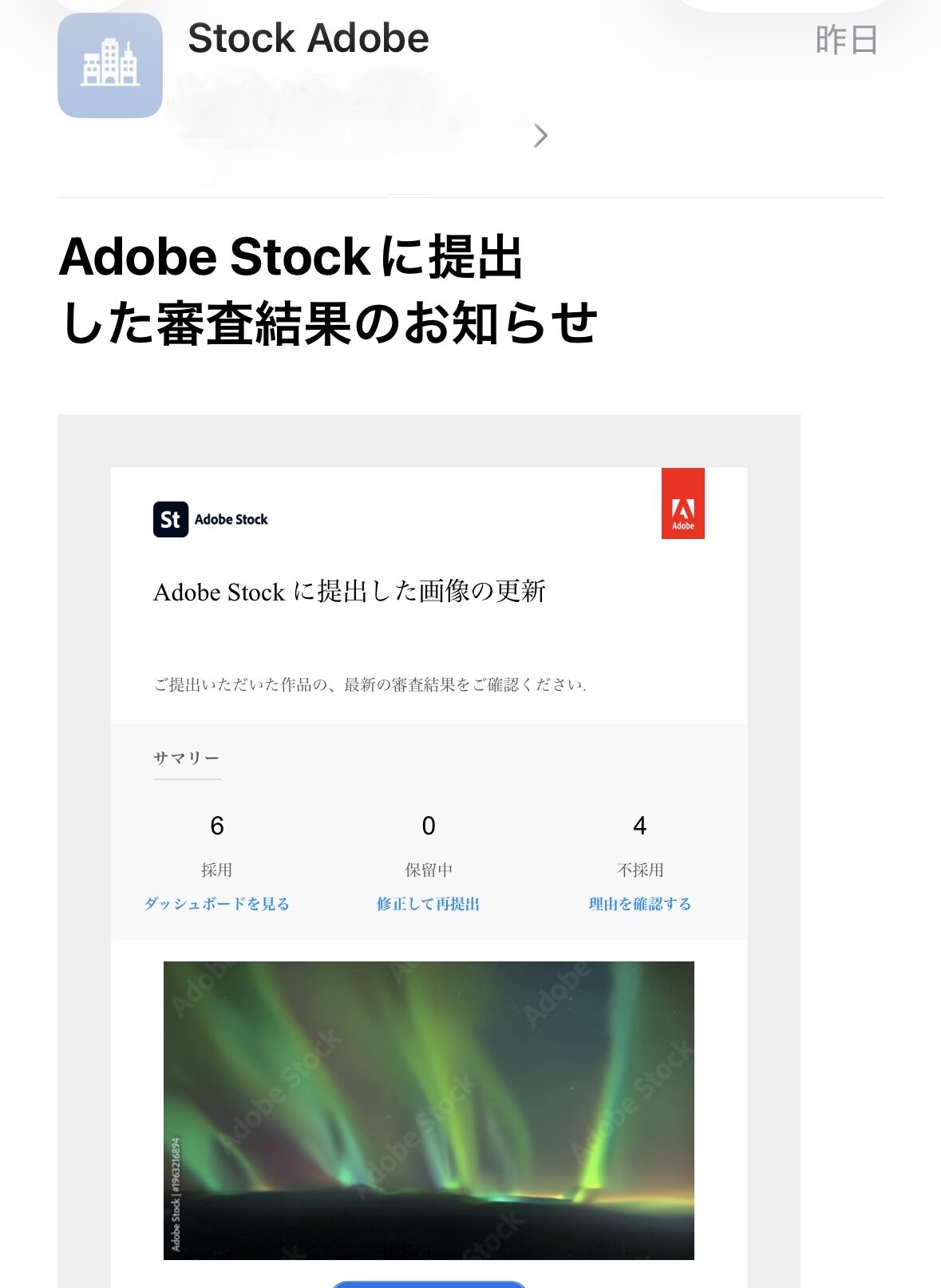
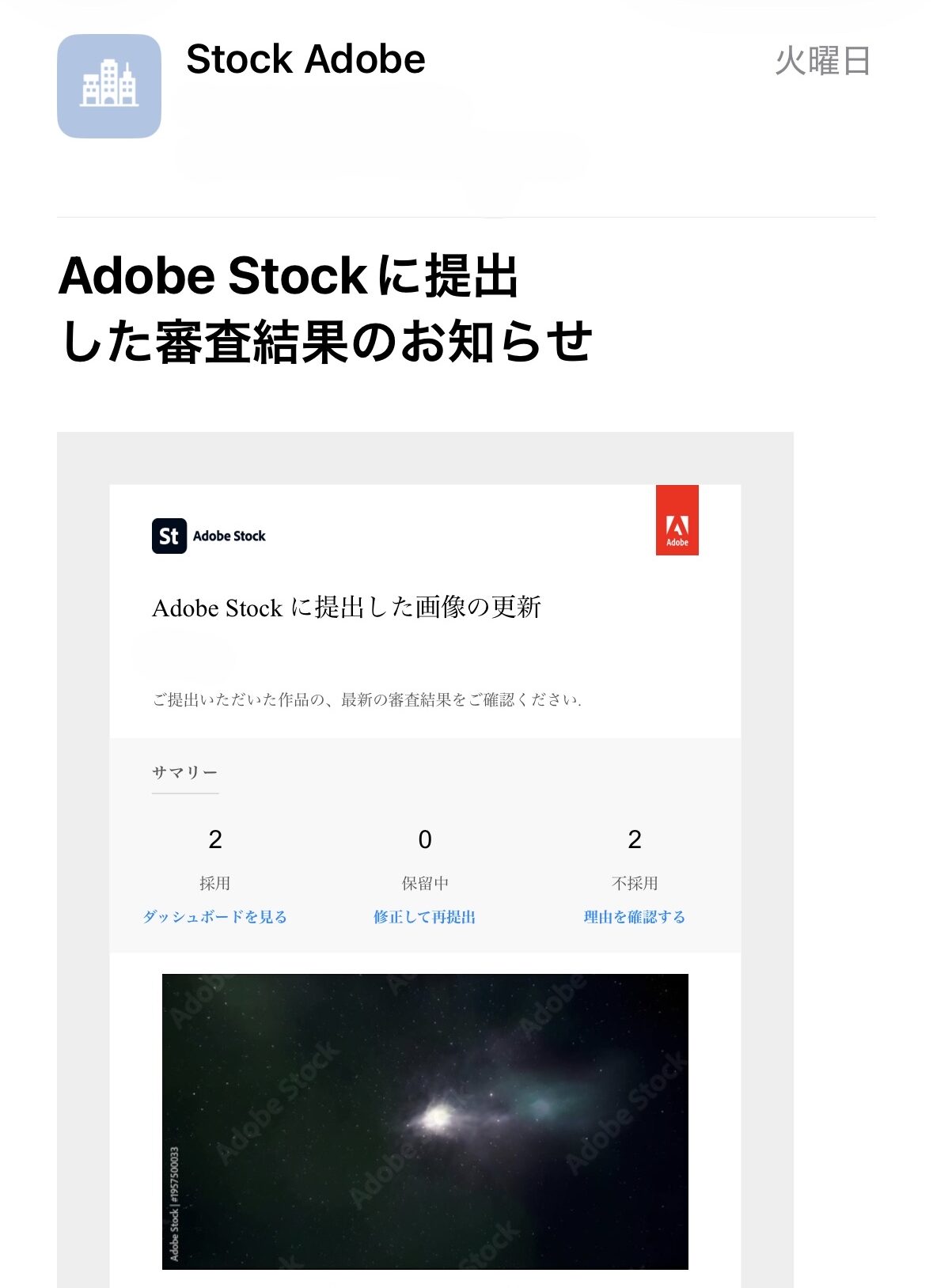
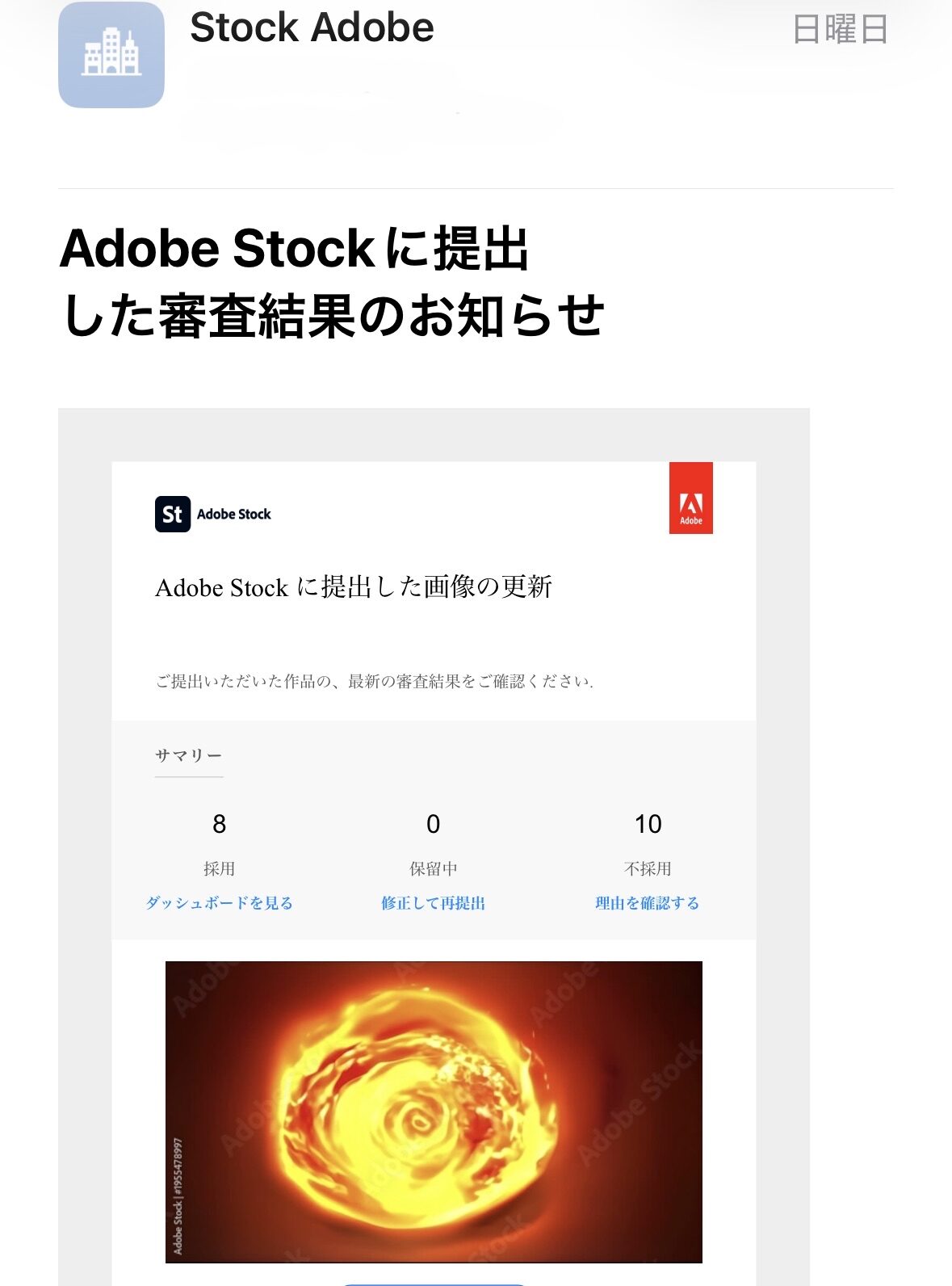
This data covers actual operations of LTX-1 on an RTX 5080 environment from January to April 2026. The figures for Adobe Stock are based on review result notification emails received directly by the author.Sources: Adobe Stock Contributor Review Result Notification Emails (April 13, 2026 – April 16, 2026 / Images with personal info redacted included at end of article)
Actual Workflow (Generation → Upload → Acceptance)
The author’s operation follows a three-stage filtering structure.
- Generate via LTX-1: Totaling 928 clips over 3 months (Jan–Apr 2026, aggregated from local storage).
- Select upload candidates during quality check: Approximately 30% of generated clips (roughly around 280) are uploaded to Adobe Stock.
- Pass Adobe Stock review: Based on data from the last 4 days, the acceptance rate for uploaded items is 45.7%.
The “percentage of total generated clips that eventually become commercial products” stands at approximately 14% (30% × 45.7%). Since 2025, Adobe Stock has tightened review standards for AI-generated assets; cases where submissions are rejected due to similarity checks (“similar content already in our collection”) have increased. Updates regarding stricter criteria were announced on the official Adobe Stock Contributor Help page for Generative AI Content starting in 2025. In this environment, a 45.7% acceptance rate falls within a practically usable range.Sources: Official Adobe Stock Contributor Help (Generative AI Content Guidelines)
Adobe Stock Review Results (Last 4 Days)
| Date Submitted | Acknowledged | Rejected | Acceptance Rate |
|---|---|---|---|
| April 13, 2026 (Sun) | 8 clips | 10 clips | 44.4% |
| April 14, 2026 (Tue) | 2 clips | 2 clips | 50.0% |
| April 15, 2026 (Wed) | 0 clips | 3 clips | 0.0% |
| April 16, 2026 (Thu) | 6 clips | 4 clips | 60.0% |
| Total (4 Days) | 16 clips | 19 clips | 45.7% |
Sources: Official Adobe Stock Review Result Emails (April 13, 2026 – April 16, 2026; four supporting images attached at the end of this article)

Example Generation Prompt for One Clip (Production-Level / Live Operations)
For reference, the author is sharing a production-level prompt used to generate one video clip specifically for Adobe Stock. This goes far beyond the “simple 30-word prompts” often introduced elsewhere; it densely weaves in English expressions of physical phenomena, cinematography terminology, optical parameters, and mood specifications to maximize LTX-1’s native output quality.
The following is a real prompt used for generating an Oil Slick Rainbow Macro (macro video of iridescent thin-film interference). Writing prompts with this level of detail manually every time would be impractical; therefore, the author has implemented a system using a local LLM (Ollama + Gemma 3 12B GGUF) to automatically generate prompts. While specific generation logic is outside the scope of this article, the prompt below represents one output from that system.
Positive Prompt
(Iridescent Thin-Film Interference: Oil Slick Rainbow Macro:1.3), (Low angle hero composition, subject rises from bottom edge, expansive upper negative space:1.2), Rainbow Band Drift Sequence, Marangoni convection spreading coefficient, Film drainage velocity gravity, Capillary number viscous-surface ratio, Thin-film equation lubrication, seamless looping motion, first and last frame match, stable camera, temporal coherence, smooth continuous motion, Tripod shot, locked off camera, stable composition, no movement, perfect framing, Central composition, Clear spatial structure, Rack focus shifting from foreground to background. The oil slicks surface flow exhibits Marangoni drift towards the right, with color bands migrating at approximately 1 mms, and interference pattern density increasing by 30 over 8 seconds At reflection angles between 40 to 50, hard directional spotlight, dramatic chiaroscuro, deep black shadows, high contrast, focused beam, Silver White Overexposed, Soft luminous pastel tones, dreamlike bloom and halation, iridescent prismatic nuances, ethereal atmospheric glow, angelic backlit translucency, subsurface scattering illumination, pearl-white highlights, celestial haze, Flat dark surface, Petroleum rainbow film, Oil slick thin-film optics, petroleum film thickness -, thin-film interference bands interference color, thermocapillary surface tension flow, iridescent band migration, angle-dependent structural color, Clear refractive index hydrocarbon film, ambient light iridescence, macro flat surface view, slow drift animation, Dreamlike beauty and weightless fantasy, angelic soft-focus atmosphere, luxury wellness and cosmetic aesthetic, serene relaxation mood. Cinematic 16:9, Widescreen, Anamorphic lens, Petroleum thin-film Marangoni band, Clear refractive index hydrocarbon surface, thin-film interference bands interference color, Angle-dependent structural color gradient, macro lens, 100mm, extreme close-up, shallow depth of field, bokeh, microscopic details,, super slow motion, weightless drift, graceful deceleration, ultra high resolution optics, optimal depth of field, maximum tonal depth, optical realism, diffraction-limited sharpness, zero distortion, sub-pixel detail, pristine optical quality, edge-to-edge sharpness, premium lens coatings, (no text:1.2)Negative Prompt
(text:2.0), (watermark:2.0), (logo:2.0), (ui:2.0), (hud:2.0), (digits:2.0), (numbers:2.0), (bad geometry:1.5), (amorphous:1.5), (unstructured:1.5), (muddy:1.5), (blurry focus:1.3), (static:1.5), (frozen:1.5), (statue:1.5), (still image:1.5), (solidified:1.3), (motionless:1.5), (grid:1.5), (mesh:1.5), (dots:1.5), (pixelated:1.5), (pattern:1.5), (human:1.5), (face:1.5), (hand:1.5), (skin:1.5), (animal:1.5), (low resolution:1.3), (artifacts:1.3), (morphing:1.5), (shaking:1.5), (flickering:1.5), (glitch:1.2), (sharp edges:1.5), (hard light:1.5), (industrial:1.5), (mechanical:1.5), (oversaturated:1.3), (heavy:1.3), (Pop:1.3), (Burst:1.3), (Dry:1.3), (Dull:1.3), (Matte:1.3), (Grey:1.3), (Black and White:1.3), (Solid:1.3), (Rock:1.3), (Wood:1.3), (Dirty:1.3), (Pollution:1.3), (Drug:1.3), (Trippy:1.3), (Oil pollution:1.3), (Chemical spill:1.3), (Toxic:1.3)LTX-1 can produce videos even with simple prompts, but to maintain acceptance rates as stock assets, such dense descriptive specifications combined with extensive negative exclusion are crucial. The prompt length exceeds 1500 characters for positive and over 500 for negative.
Concept of Mass-Generating Prompts via LLM (Initial Manual Template Example)
In mass-producing stock assets, writing numerous similar prompts manually leads to overlap, resulting in “similar content” rejections during review. Initially, the author would also input instructions into a Gemini Pro chat interface by hand and request batch outputs of video prompts with variations.
The following is a simplified version of the template used at that time. By pasting this directly into an LLM’s chat window and asking it to “output N clips,” you can receive N ready-to-use prompts for LTX-1 in one go.
# Bulk Generation Template for LTX 1 Video Prompts (Simplified Version) [Common Conditions] - Number of Clips: N (e.g., 30 clips) - Purpose: Positive + Negative prompts for LTX 1 video generation - Each clip must be unique to minimize overlap. [Example Themes – Roughly Equally Distributed] Theme A: Tactile Material Expressions Subject: High-viscosity liquid metal, surface tension, microscopic bubbles, subsurface scattering Reference Vocabulary: macro cinematography of viscous molten material, tactile density, surface tension, subsurface scattering, anisotropic highlights. Theme B: Spectral Optical Phenomena Subject: Light diffraction/refraction/spectroscopy/attenuation/bokeh Reference Vocabulary: abstract spectral energy fluid, volumetric glowing particles, fiber optic light trails, diffraction, anisotropic bokeh. Theme C: Micro-Biophysics Subject: Cell membranes/bioluminescence/transparency of organic tissues Reference Vocabulary: bioluminescent membrane, organic tissue transparency, electron microscope aesthetics, subsurface scattering in organic matter. [Common Ending Tags (Append to end of positive prompts)] (black background:1.3), (best quality, 4K, uhd:1.2), ultra-detailed, (seamless loop:1.3), (smooth motion:1.2) [Common Negative Prompts (Must be included in negative section] (no humans, no face, no hand, no bad anatomy:2.0) (no text, no watermark, no logo:2.0) (no architecture, no straight lines, no buildings:1.5) (no distortion, no artifacts, no blurry, no halos:1.5) [Output Rules] - Output positive and negative prompts as a set for each clip. - No explanatory text or greetings; output only the prompt body itself. - Cycle through Theme A → B → C to distribute the specified number of clips evenly.Feeding this template into an LLM (Gemini Pro, Claude, ChatGPT, local LLMs, etc.) yields 30–100 prompts for LTX-1 in a single interaction. This is overwhelmingly faster than thinking through each one manually and is ideal for mass production as it minimizes overlaps.
The author’s current operation has evolved from this initial template to full automation via local LLMs (Ollama + Gemma 3 12B GGUF, resident on the RTX 5060 Ti side of Oculink). Specific mechanisms regarding axis selection, quality tuning, and overlap detection are outside the scope of this article.
Three Reasons Why LTX-2.3 is Unsuitable for High-Volume Work with 16GB VRAM
1. Cannot be Loaded via Standard Loader (Technical Barrier)
The distilled version of LTX-2.3 adopts the LTX AV (Audio-Video Integrated) architecture, adding audio parameters within its transformer. The ComfyUI-LTXVideo GitHub README explicitly states that AV models can only be loaded via dedicated nodes; attempting to load them with ComfyUI’s standard CheckpointLoaderSimple will fail due to dimension mismatch.Sources: Lightricks/ComfyUI-LTXVideo (Official Custom Node Repository)
RuntimeError: Error(s) in loading state_dict for LTXAVModel: size mismatch for adaln_single.linear.bias: copying a param with shape torch.Size([36864]) from checkpoint, the shape in current model is torch.Size([24576]).To run it, you must update the ComfyUI-LTXVideo custom nodes and restructure your workflow using AV-compatible nodes such as LTXVAudioVAELoader, LTXVSeparateAVLatent, etc.
2. Model Size is 29.5GB → Offloading Required to Fit into 16GB VRAM
The fp8 checkpoint on disk is 29.53 GB. To fit this into a 16GB VRAM environment requires massive CPU offloading, which drastically reduces inference speed. While LTX-1 takes about 5 minutes per clip (including RIFE VFI), the offloaded operation of LTX-2.3 could take tens of minutes. The Hugging Face model card for LTX-Video-2.3 also lists a recommended VRAM of at least 24GB.Sources: Hugging Face Lightricks/LTX-Video-2.3 Model Card
3. Tuning Costs Do Not Justify Commercial ROI
Building an optimal workflow for LTX-2.3 (AV node wiring, VAE separation, tile optimization) requires days to weeks of effort. The author has already achieved a 45.7% acceptance rate on Adobe Stock using LTX-1; shifting away from this proven success to version 2.3 is not justified by the potential revenue impact.
Three Options for Users with 16GB VRAM
Option A: Operate LTX-1 Locally (Author’s Recommendation)
ltxv-2b-0.9.8-distilled), which falls under the LTXV Open Weights License 0.X. The measurements below were taken on v0.9.1.LTX-1 (ltx-video-2b-v0.9.1) is lightweight at 5.72 GB, with measured times of 5 min 9 sec per clip on RTX 5080 and 9 min 12 sec on an RTX 5060 Ti via Oculink (including RIFE VFI). That is fast enough to keep a production line moving, backed by a track record of generating 928 clips in 3 months.
Guidelines for GPU selection:
- RTX 5060 Ti 16GB: Approx. ¥105,000 new (lowest price on Price.com as of April 2026). The lowest-cost entry point for LTX-1 mass production; the model used in this article’s benchmarks.
- RTX 5070 / 5070 Ti: Faster generation times than the 5060 Ti, offering a good balance between cost and speed (mid-range option).
- RTX 5080: Approx. ¥200,000+ (lowest price on Price.com as of April 2026). The fastest line in this article.
Sources: Price.com Graphics Card Category (Verified April 2026)
Option B: Cloud-Based Video Generation Services
As of April 2026, cloud video generation is in a period of intense fluctuation. OpenAI Sora ended its web and app versions in April 2026, with API support scheduled to cease in September. The following services are strong alternatives:
- Google Veo 3.1: Supports native 4K 60fps video and 48kHz audio (Official Google DeepMind).
- Kling 3.0 (by Kuaishou): High accuracy in physical simulation, capable of generating clips up to 2 minutes long.
- Runway Gen-4.5: Extensive adoption examples from film production sets (Official Runway), with strengths in camera movement control.
- Seedance 2.0: Offers a free tier, allowing you to start at zero cost.
No local GPU required; monthly costs range from several thousand yen to tens of thousands of yen. However, commercial licensing and AI credit attribution requirements vary by service, so checking license conditions is mandatory before submitting to platforms like Adobe Stock.Sources: Official Service Pages (Verified April 2026)
Option C: Invest in GPUs with VRAM ≥24GB
This includes the RTX 3090 (used, from approx. ¥150,000), RTX 4090 (from approx. ¥300,000), RTX 5090 (from approx. ¥500,000), and professional cards like the RTX A5000/A6000. This is a prerequisite for unlocking LTX-2.3’s full potential.Sources: Price.com Graphics Card Category (Verified April 2026)
Summary: Don’t Chase the Latest; Mass Produce with Proven Models
This article covers the benchmark data for the generation stage. The full pipeline is Generation → Interpolation → Upscaling → Final Output, and the end goal of that workflow is to produce Adobe Stock submission files in 8 seconds duration, 4K resolution (3840×2160), at 60fps as H264 mp4.
As of April 2026, if you aim to produce video at volume with a GPU having 16GB VRAM, LTX-1 (the lightweight 2B version) is the practical solution, not the newer LTX-2.3. If you plan to sell the output, use a v0.9.6 or later checkpoint (for example ltxv-2b-0.9.8-distilled), which falls under the LTXV Open Weights License 0.X.
Benchmarks show generation times of 5 min 9 sec per clip on an RTX 5080 and 9 min 12 sec on an RTX 5060 Ti via Oculink (LTX-1 + RIFE VFI). While the 4K upscaling step requires additional time as a separate process, it is possible to run a production line within the tight constraints of a 16GB VRAM limit. Ensuring at least 64GB RAM (96GB recommended) guarantees stable operation; even with 32GB, lightweight settings have been used successfully for review approval; and 12GB GPUs can also be utilized by combining them with PurgeVRam-type custom nodes.
If you wish to experiment with LTX-2.3 without upgrading your hardware beyond the current limit, options include using Lightricks’ official LTX Studio or cloud services like Fal.ai and Replicate. Since these operate on a pay-as-you-go basis, it is practical to test their behavior via the cloud before deciding whether to transition them locally for full-scale adoption.
The information in this article reflects conditions at the time of writing. Evaluations may change due to product updates, third-party benchmarks, price fluctuations, or runtime compatibility changes. We recommend re-evaluating content after a certain period has passed.
References
- Hugging Face Official: Lightricks/LTX-Video Model Card
- GitHub Official: Lightricks/ComfyUI-LTXVideo (Official ComfyUI Nodes for LTX Video)
- GitHub Official: megvii-research/ECCV2022-RIFE (RIFE Frame Interpolation)
- NVIDIA Official: GeForce RTX 5080 Product Page
- Adobe Official: Adobe Stock Contributor Generative AI Content Guidelines.